


Green Dot - Mobile Banking
3.532.79K Reviews
App Specs
- Version
- 4.69.5
- Updated On
- License
- Free
- Downloads
- 5,000,000+
- Developer
- Green Dot
- Categories
- Finance
- Platform
- Android, iOS
Screenshots

 Analysis by AppCompare
I tend to judge a banking app by how clearly it separates my money from someone else’s, not just by how quickly it shows a balance. That matters when a household shares a phone, helps a relative get started, or coordinates bills while keeping accounts personal. Green Dot - Mobile Banking is a finance app from Green Dot, and its straightforward approach makes it worth considering for everyday account tasks. I would treat it as a tool for managing an individual account, though, rather than a shared household dashboard.
First Impressions
When you first fire up Green Dot - Mobile Banking, you're greeted with a clean and intuitive interface. I’m talking about something that even your tech-challenged uncle could navigate with ease. The app’s design is sleek and modern, making it easy to find whatever you’re looking for without feeling like you're on a scavenger hunt.
The registration process? Smooth as butter. It literally took me just a few minutes to get everything up and running. You just need to enter some basic info, and you’re good to go. It’s perfect for those of us who are impatient and want to get things done quickly.
Setting It Up Without Blurring Account Boundaries
A shared device can make banking convenient, but it also makes privacy a practical concern. I’d set up the app for the person whose account it is, using that person’s own access details, rather than treating one login as a family login. A simple-looking interface does not make an account suitable for several people to share: balances and transaction history are personal financial information.
If a partner or relative is helping with setup, I’d keep the account holder involved and make sure they understand what is being entered before continuing. That’s useful even when the helper is trusted; it avoids confusion about whose details are tied to the account and who should handle future account questions. On a shared phone, I’d also be deliberate about who can unlock the device and see its notifications. Those are sensible household habits, not special controls I’d assume the app provides.
Features That Stand Out
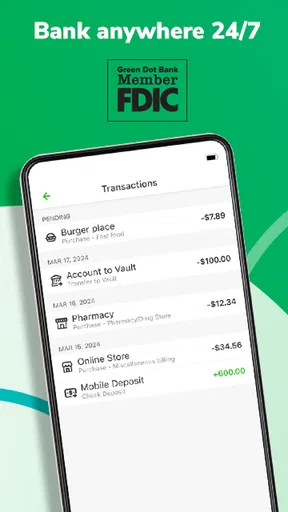
Once you’re in, the app really starts to shine. One of the standout features is the ability to manage your funds effortlessly. You can check your balance, view transaction history, and even transfer money with just a few taps. No more waiting in line at the bank or dealing with tedious paperwork.
For a household routine, that combination is more useful than it first sounds. If I’m checking whether a regular expense has cleared before making another purchase, the balance and transaction history give me a quick way to review activity in one place. I’d use the transaction list as a check against my own notes, not assume that a glance at the balance alone explains every change. That small habit can help prevent an ordinary payment from being mistaken for money still available to spend.
Worth Reading Before You Choose

EA SPORTS FC Mobile 26 Is a Bigger Football Game, but It Takes Time

Flipboard Shows What News Apps Must Do Beyond the Feed

Switching to Android Auto Means Rethinking Your Driving Routine

Google Calendar Makes a Crowded Week Easier to Manage

Ludo King Makes the Most of the Minutes Between Plans

Baby Panda World Brings Quick Play to Modern Phones, but Its Game Library Feels Busy
Another cool feature is the direct deposit option. For those who like to get their paycheck early, Green Dot lets you receive your funds up to two days earlier than usual. Who doesn’t love getting paid early?
I’d think of early access as a timing convenience, not as extra income or a dependable fix for a tight budget. For example, if a household plans groceries around a payday, it is still wise to make the plan using the expected pay schedule rather than relying on funds arriving early. That way, an early deposit can be a welcome surprise without becoming a commitment that causes trouble if timing varies.
Oh, and did I mention the bill pay feature? The app allows you to pay your bills directly from your account, keeping everything streamlined. No more juggling between different apps or websites to make sure your bills are paid on time.
For shared expenses, I’d agree on who is responsible for each bill outside the app and use the transaction history afterward to check what has been paid. That is a practical way to coordinate without handing around one person’s login. If several adults need to manage a common pool of money together, an account or service built specifically for shared access may be a better fit than relying on an individual mobile-banking account.
Security and Reliability
Now, I know what you might be thinking: “How secure is this app?” Well, I’ve done my homework, and Green Dot employs industry-standard security measures to keep your data safe. It uses encryption and other security protocols to ensure that your info doesn’t end up in the wrong hands.
In terms of reliability, I’ve had no issues with the app crashing or lagging, which is a big plus in my book. There’s nothing more frustrating than an app that decides to take a nap right when you need it the most. Thankfully, Green Dot seems to have that under control.
In everyday use, my own rule would be to review activity privately rather than passing a phone around so everyone can inspect it. If another person needs to know whether a bill was paid, sharing the relevant result directly is more careful than exposing the full account history. A banking app can make routine checks easier, but household trust still depends on agreeing what information to share and what should remain private.
Coordinating Money Around the Home
A realistic use case is a person who receives pay by direct deposit, checks the account while planning weekly spending, and pays a household bill from the same place. The app can bring those individual tasks together, which is handy when work or family responsibilities leave little time for a branch visit. The useful workflow is simple: check recent activity, confirm the money you expect is there, then handle the bill and review the transaction afterward.
That workflow is not the same as a shared budget. I would keep a separate note, calendar, or household budgeting method for who owes what and when, especially if costs are split among adults. The app’s balance and transaction history can help verify account activity, but they do not replace an agreement about contributions. This distinction is important: convenience for one account holder should not be confused with automatic coordination among several people.
Compared with a traditional bank’s mobile app, Green Dot may appeal to someone who wants a direct route to common account tasks rather than a broad financial hub. Compared with a budgeting app, it serves a different purpose: it helps handle banking activity, while budgeting tools are generally where I’d organize goals, categories, and shared plans. If you already depend on a bank app that covers your needs, switching just for a clean interface may not be worthwhile. If your main frustration is handling routine banking on the go, the focused approach is easier to appreciate.
Age, Trust, and Who Should Use It
The app is rated for Everyone, but I would not read that as a reason to let a child independently use an adult’s banking account. Age suitability for an app and permission to access someone’s money are different questions. For a younger family member, I’d keep the account holder or responsible adult in charge of setup and decisions, and explain plainly what a balance, transfer, or bill payment means before involving them in any account activity.
Green Dot is a better match for an adult who wants to check an account, follow transactions, receive direct deposits, and pay bills from a phone. It may also suit someone helping a relative with permission, provided the account holder stays in control of their credentials and choices. I’d skip it as a household’s central money-management solution if everyone needs separate permissions, shared visibility, or a joint view of spending; those needs call for a product designed around shared finances.
Green Dot is free to download, has a 3.5 average from around 91,000 ratings, and has been installed over 5 million times. It is rated for Everyone, and version 4.68.0 requires Android 6.0 or later. Green Dot has been developing the app since its May 17, 2011 release, so it is not a new arrival in mobile banking. Those details help set expectations, but I’d still judge it by whether its account tools suit the way you actually handle money.
Customer Support
Let’s not forget about customer support, because we all know how crucial that can be. The app provides a variety of ways to get in touch with support, including phone, email, and even live chat. From my experience, their support team is responsive and helpful, which is always reassuring when you’re dealing with financial matters.
For any banking issue, I’d first identify the specific transaction or account question and keep relevant details close before contacting support. That makes it easier to explain what happened without sharing more personal information than necessary. In a household where someone else helped with the original setup, the account holder should remain part of a support conversation so the person responsible for the account can make decisions directly.
Final Thoughts
So, is Green Dot - Mobile Banking worth your time? If you’re looking for a user-friendly app that offers a comprehensive suite of features, I’d say it can be a solid choice for routine banking. Its balance checks, transaction history, transfers, direct deposit, and bill pay make the most sense when one person wants to manage their own account without making every task a trip to a bank.
While it might not replace all your banking needs, it certainly covers the bases for day-to-day transactions and money management. If simplicity and accessibility are what you’re after, it is worth considering. I’d recommend it most to an individual who values convenient account access and can keep their login private. For a family that needs genuinely shared control, coordinated budgets, or child-specific money tools, I’d choose something designed for those jobs instead of expecting a personal banking app to provide them.
Pros
- User-friendly interface for easy navigation.
- No monthly fees with eligible direct deposit.
- Instant transaction alerts for security.
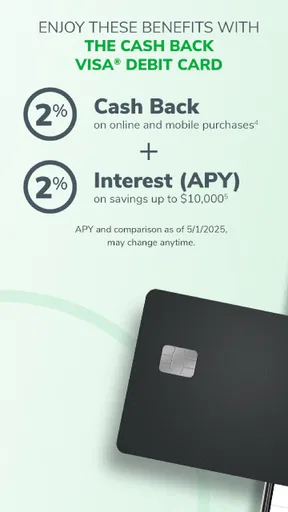
- Cash back rewards available on purchases.
- Early access to direct deposits.
Cons
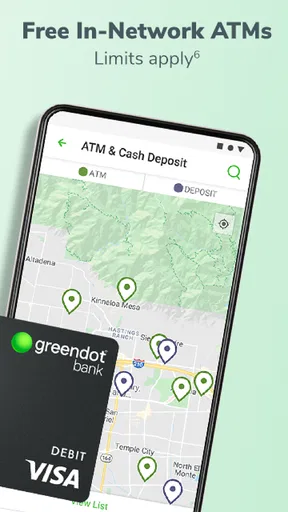
- Limited ATM network for free withdrawals.
- Customer service can be slow at times.
- Mobile check deposit can be delayed.
- Some features require a monthly fee.
- Not suitable for international use.
FAQs for Green Dot - Mobile Banking
What features does the Green Dot Mobile Banking app offer?
The Green Dot Mobile Banking app provides a range of features including easy fund transfers, mobile check deposits, bill payments, and real-time transaction alerts. Users can also access free ATM withdrawals at participating locations and manage their accounts on the go. It’s designed for convenience and flexibility in managing finances.
Is the Green Dot app secure for online transactions?
Yes, the Green Dot app prioritizes security with encryption and multi-factor authentication to protect user data. Additionally, users can enable notifications for any account activity, which helps in monitoring unauthorized transactions. Regular updates ensure that the latest security protocols are in place.
Are there any fees associated with using Green Dot Mobile Banking?
While downloading the app is free, users may encounter fees depending on their usage. Monthly maintenance fees, ATM withdrawal fees (outside the free network), and foreign transaction fees might apply. It's advisable to review the fee schedule on the official website or within the app for detailed information.
Can I deposit checks using the Green Dot app?
Yes, the Green Dot app supports mobile check deposits. Users can deposit checks by taking a photo within the app. Make sure to endorse the check properly and follow the in-app instructions. It may take a few business days for the check to clear and funds to become available.
What should I do if I encounter issues with the Green Dot app?
If you experience any issues, you can contact Green Dot’s customer support through the app or their website. They offer assistance for technical issues, account inquiries, and transaction disputes. Additionally, the app includes a comprehensive FAQ section and community forums for troubleshooting common problems.


